顯示具有 VBA API 標籤的文章。 顯示所有文章

2016年11月9日 星期三

[Creo API] Compiler and platform support information

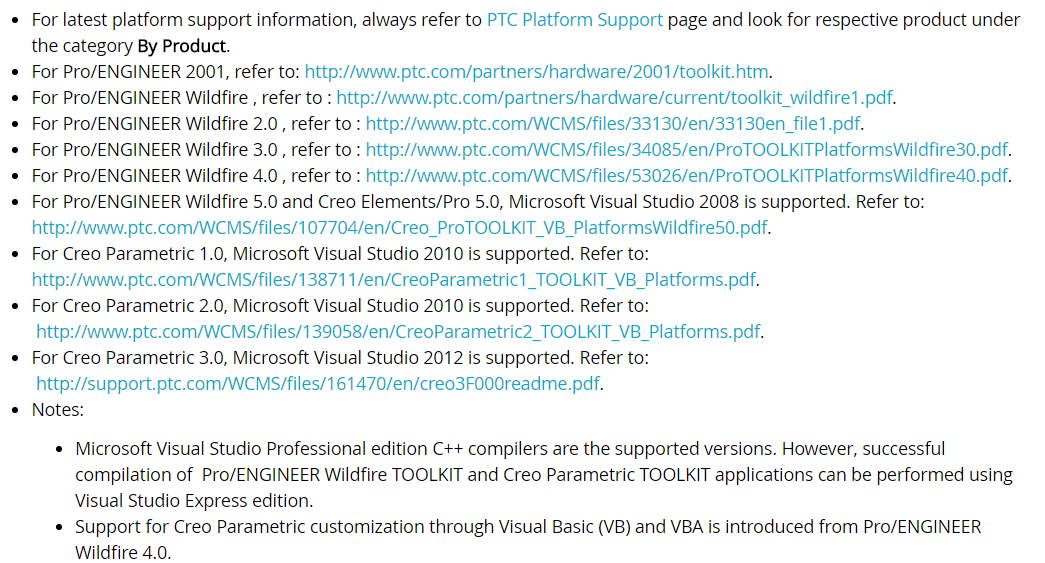
Information for Pro/ENGINEER Wildfire TOOLKIT, Creo Elements/Pro TOOLKIT, Creo Parametric TOOLKIT and VB API.

/=====================================================/
Compiler and platform support
發佈者: fengsw2008 文檔分類: Java 文檔格式: DOC
出處:PTC CS Support => Document - CS44547
/=====================================================/


2016年5月19日 星期四

Creo How to import points? 如何匯入點群

Creo How to import points?


工作上有時候需要從外部讀入曲面的資料,尤其是逆向工程由3D量側的點群,該如何作呢?

1) Open a new text file with the x, y, z locations and key in x y z  coordinate

-100.000 -40.013   1.255
 -99.999 -45.012   1.276
-100.001 -50.011   1.292
 -99.999 -55.009   1.305
 -99.999 -60.007   1.311
 -99.999 -65.006   1.309


2) Save as text file as "*,pts" => "new-file-name.pts"


3) Insert points into a part file using Import function (Creo)

Import

http://creosimpleautomation.blogspot.tw/


Open a pts file

http://creosimpleautomation.blogspot.tw/


Done

http://creosimpleautomation.blogspot.tw/


Enjoy it!


2016年3月23日 星期三

[Share] CAD 軟體市占率(2015)

CAD 軟體,因為用途、產業、使用習慣導入等,已經有越來越不一樣的趨勢,隨著個人、3D列印、創客的增加,免費一定是會增長的,看來要研究一下Free CAD了,免得改天沒工作。

約20年前,很多的軟體還要key入指令才能夠運作,現在都是圖形話介面,而未來應該是直接用說的或是思考就可以驅動CAD 繪製圖面。

專業Pro的3D CAD中還是有區分高階、中階跟低階這些的區分為何,有時候要看產業別的應用為何,在整體CAD市場中,市占率畢竟還是難敵低價、免費跟好操作的中低階軟體...

CAD是一種設計工具,可以讓工程師更簡單、更快速及更方便的在產品產出階段前去實現設計意圖,這跟設計構思的強弱沒有絕對的關係!

好用的工具用的習慣就好,來看看2015關於3D CAD 的市占率

------------------------------------------------------------
以下資料跟圖片來自blog.cnccookbook.com
(http://blog.cnccookbook.com/)
------------------------------------------------------------

Pro


Mid


Free


版權所有請勿轉載或複製
http://creosimpleautomation.blogspot.tw/

------------------------------------------------------------------------------------------------------------

2016年3月15日 星期二

[觀點] 機構產品設計_CAD建立步驟

如果你是產品機構的新手,或是轉換CAD system你會花錢上CAD課、也可能直接入社會跟前輩學習~

<照片擷取自網路的教學課程>


若是只是為了學CAD使用指令,直接上一門課程付出時間跟費用....

但....有天當你成為一個機構工程師後,會發現.....上課與證照,有些部份你只是多花錢的,但學到的卻不是有用的方式!

...看看原廠上課的教材 CAD如何建構Model 圖<#1>

CAD指令對不對?都..........對

但是,當要設計變更時一變更後,嗯.....模型怎會長這樣子(#2~#4)

或許,這只是要表達某些指令特徵而創立的Model,卻沒有融入設計步驟的觀念,最終你給新手的參考只是一個不合適的示範模型。


<#1>


<#2>


<#3>


<#4>


機構設計不是只要會CAD 指令操作,你設計中有50~80%是在「設計變更」產品修正;

指令的學習一點就通,重要的是設計程序! 

這是很多機構工程師都忽略的,反正產品出來就好了....


設計程序結合了產品經驗、製作方法,設計修改意圖等等;沒有這些東西,你只是一個會指令的操作員,套句大家常開的玩笑話 => 只要會extrude & cut指令,就可以作機構工程師了。

從這模型中,會發現此CAD建立步驟,有些特徵參照就是隨意參考甚至是錯誤參考,沒有考慮設計修改,當要設計變更時自然會再生模型錯誤,更深入的若想要設計參數自動化更是不可能!


2016年3月6日 星期日

[Creo VBA] How to update Parameters ?

How to update Parameters?

在前面,有介紹如何變更參數Creo VBA API_由Excel設計變更修改Creo Parameter參數

,這裡用一個簡單的範例來說明參數是如何的更新,以及程式碼的分享。

Here's a simple example to illustrate how to update parameters, and share code.


1) 先在Creo 中設定好模型與參數
     First Create a model and set parameters.


2) 參數表 Parameter table


3) Excel VBA撰寫程式與介面
     Programming and  interface.


4)執行Excel VBA,同步設計變更
   Executive Excel VBA, synchronous design changes.


5) Update Parameter => Excel VBA Code

'-------------------------------------------------------
Private Sub Update_Dim_Click()

Dim px As IpfcParameterOwner
Dim p01(3), p02(3) As String
Dim p1 As IpfcParameter
Dim p2 As IpfcBaseParameter
Dim Mitem As CMpfcModelItem
Dim pv1 As IpfcParamValue

...
...
...

End Sub

'-------------------------------------------------------


2016年2月22日 星期一

[Creo API] 由Excel設計變更修改Creo Parameter參數

上一篇 [Creo VBA API_How to get Parameters quickly? 如何快速獲取參數 ?],如何藉由Excel快速獲取參數 !

藉由Excel取出參數只是一個附屬的功能,真正要做的是「由Excel設計變更修改Creo Parameter參數」進行實現快速的設計自動化;

Get parameter value is only a subsidiary function via Excel,
Really need to do is "From Excel to modify the design changes of Creo Parameter" rapid design automation;

為何這樣說呢?

若你有100個以上的參數要變更,一個一個在設計table表中例出,然後又一一的在Creo 參數表中輸入,那真的會花費許多時間!
If you have more than 100 parameters to change,one by one listed in the table design table , and then another one in Creo input parameter table, it really takes a lot of time!


來看看怎麼實現透過Excel VBA API設計變更修改Creo CAD 參數
Show you how to get the parameter via Excel VBA API

Step 1: Excel VBA API  <=> Creo CAD ,取得Parameter參數


Step 2: 從Excel 修改Parameter參數,黃色欄位 
             Modify Parameter Parameter from Excel, yellow field
    - 1) NO_PT1_CIRCLE  16 => 6
    - 2) TYPE_PT1  2 => 1 
    - 3) TYPE_PT2  2=> 1

請留意,除了數量變動外,特徵已經變更了
The value has been changed and features have changed.


2016年2月21日 星期日

[Creo API] How to get Parameters quickly? 如何快速獲取參數 ?

One buttom gets all the parameters.


上一篇 [Creo Relations_Parameter(參數)],談到了什麼是參數Parameter,當你開始使用簡易的設計自動化時,設定的參數不會太多甚至只有10個以下,但是當設計架構越來越複雜的時候,要細部控制的條件越來越多時,參數往往是超過100個以上 (我有一個專案,目前的控制及非控制參數約300個),在這情況下,若是在Creo的環境中,找參數、改參數、甚至是數參數數量都是一件不簡單的事情。
Previous [Creo Relations Parameter (parameter)], talking about what are the parameters Parameter, when you start using a simple design automation, parameter setting will not be too much even only 10 or less, but when more and more complex design architecture conditions of time, to control more and more detail for a long time, often more than 100 parameters above (I have a project, the current control and non-control parameters approximately 300);
In this case, find the parameters, change parameters, and even the number of calculation parameters are a difficult thing


言歸正傳!

How to get Parameters ? 如何獲取參數 ?

Method 1:
Tools >Parameter>File>Export ,選擇csv or text format,然後用Excel或是筆記本匯入即可(參考下圖)。


匯入Excel的參數列表


How to get Parameters quickly? 

上面,這是每個人都會做的,差別只是知道跟不知道而已,但是這還是太慢了,因為要好幾個步驟,若是常常作,肯定會是一件累人的事情而又沒效率的事情,所以呢?
有沒有什麼方法,可以如何快速獲取參數 ?
Is there any way, how you can quickly get the parameters?

使用Creo VBA API,這部份就是要利用Creo 提供的API撰寫一個Excel VBA API,來讀取參數了,如下。

Use Creo VB API, this part is to use API Creo offers a writing Excel VBA API, to read the parameters, as follows.


Method 2:

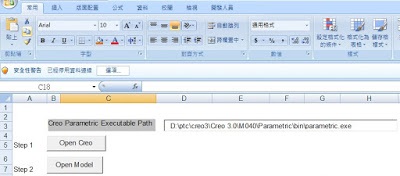
Step 1:Open Creo


Step 2:Open Model (找出需獲取參數的檔案)


Step 3: 取得參數的資訊 Get parameters information

這範例,我將Open Model及Get Parameter這兩個步驟寫在一起,所以打開檔案就會自動取得參數
This example, I'll Open Model and Get Parameter write these two steps together, so open file will automatically obtain the parameters.


來比較一下左邊是Creo Parameter 畫面 (螢幕無法擷取全部),右邊是Excel VBA的資料,是不是很簡單呢?
To compare the figure below,the Left information is the Parameter table and the right information is Excel VBA table.

利用Excel VBA API 一個Open的按鍵動作,就將Creo Model中的參數全部取出。

Use Excel VBA API, an Open operation command. Get all of the parameters from Creo Model.